

The Lightspeed manual
API keys and service access
An API key gives a program access to the core gateway. Its authority has three parts: the scope it reaches, the method groups it may call, and whether it may name an actor. Core checks those facts on each request. It does not look up a Platform user or apply that user’s role.
This distinction matters when giving someone a key. A key with the session
group can read and control private sessions in its universe. It is an
integration credential, not a personal token constrained by the holder’s
Platform membership.
Gateway modes
Set LIGHTSPEED_AUTH_MODE explicitly; the gateway refuses to start without it.
| Mode | Behavior |
|---|---|
authenticated |
Each request requires Authorization: Bearer lsk_…. The gateway resolves an active key and checks scope, method group, and any actor assertion. |
single |
Unauthenticated local development access to the universe selected by LIGHTSPEED_PG_UNIVERSE_ID, plus deployment administration. Keep this listener private. |
Single mode rejects authorization, universe, actor, and the retired principal
headers. It cannot be combined with authenticated clients. The Platform uses
authenticated mode, including in the full development stack. The former
trusted-header and api-key modes are no longer supported.
In authenticated mode, scope determines how the request selects its target:
| Key and operation | x-lightspeed-universe |
|---|---|
| Universe key, universe operation | Omit it. Even the key’s own universe UUID is rejected as a header. |
| Deployment key, universe operation | Required; selects the target universe UUID. |
| Deployment key, deployment operation | Omit it; the operation addresses the deployment. |
initialize accepts either key scope before universe selection and requires
that the universe header be omitted. It reports key scope and groups without
listing universe resources.
A universe key cannot call deployment operations. A deployment key can reach
any universe, but only through its assigned method groups. Groups cover API
families such as session, profiles, mcp, and environments; they are not
Viewer, Contributor, Operator, or Admin roles. For example, session includes
session mutations as well as reads and blob reads. blobs/put is separate so
a connector can upload attachments without reading sessions. Exact groups are
listed in the API reference.
Session deletion and retention changes require the separate session/delete
group; existing session keys do not gain those capabilities. Direct
session/delete calls permanently delete by default; softDelete: true retains
hidden history. Listing and purging already soft-deleted sessions require a
deployment key with deployment/sessions. Provision these groups on service
keys that need them. Platform always forces soft deletion for member requests
and reserves its audited purge route for Platform admins.
An actor assertion uses x-lightspeed-actor. Only keys created with
assertActor may send it. Core records the opaque actor ID for attribution;
asserting a user does not reduce the key to that person’s permissions. The
Platform checks membership, role, and session visibility before asserting its
user’s ID. Any other service allowed to assert actors must make its own
authorization decisions.
Bootstrap without Platform
Use lightspeed-runtime api-key provision on the server host after migrations
to generate a deployment administrator key, or supply its secret through
LIGHTSPEED_BOOTSTRAP_API_KEY. The command prints JSON for protected capture.
The key uses the ordinary hash store and remains revocable. Repeated
provisioning never restores a revoked key or changes its authority. The
initial deployment key does not require an existing universe.
Connect with lightspeed connect add, select with connect use, and create
universes through the CLI. Both development launcher profiles provide an
automatic connect dev handoff. See
Use Lightspeed from the terminal for the complete
standalone and Platform-compatible setup.
Bootstrap the Platform
For local development, use the root launcher. It provisions the authenticated stack. For a manually operated deployment, first configure the stores and apply migrations as described in Self-hosting, then mint the Platform’s key from the server host:
lightspeed-runtime api-key create \ --deployment --assert-actor --name "Platform"From a source checkout, replace lightspeed-runtime with
cargo run -p temporal-runtime -- in these commands.
Omitting --group grants every group allowed by the scope. This is intentional
for the Platform, which manages universes and keys as well as member requests.
The command prints the secret once. Store it as
LIGHTSPEED_PLATFORM_API_KEY in the Platform’s protected configuration and set
LIGHTSPEED_API_URL to the gateway’s /rpc endpoint. Set the gateway to
LIGHTSPEED_AUTH_MODE=authenticated.
Before the Platform’s first startup, also set
LIGHTSPEED_PLATFORM_ADMIN_EMAIL and LIGHTSPEED_PLATFORM_ADMIN_PASSWORD in
its protected configuration. When its users table is empty, Platform creates
that local administrator account. These settings do not reset an existing
account or grant a runtime key to the browser. Sign in with the new account,
then create a universe and add members as described in
People and roles.
If provisioning a universe directly through the server host, use
lightspeed-runtime universe create --slug acorn and retain its
printed UUID. Platform-created universes are provisioned through its deployment
key. See People and roles for account administration.
Create, rotate and revoke keys
Universe Admins can open their universe’s API keys page, choose Create key, supply a name, and choose the method groups the key may call. The form starts from the Agent client preset (sessions, blob uploads, models and workspaces) and also offers Configuration and All groups; any box can be ticked or cleared. Credential leasing and channel delivery are never included unless chosen, and the form warns when they are, as it does for sessions, which reach private sessions too. Keys minted here never assert actors. The list shows what each key may call. Copy the displayed secret into the client’s protected credential configuration before closing the dialog; it cannot be recovered.
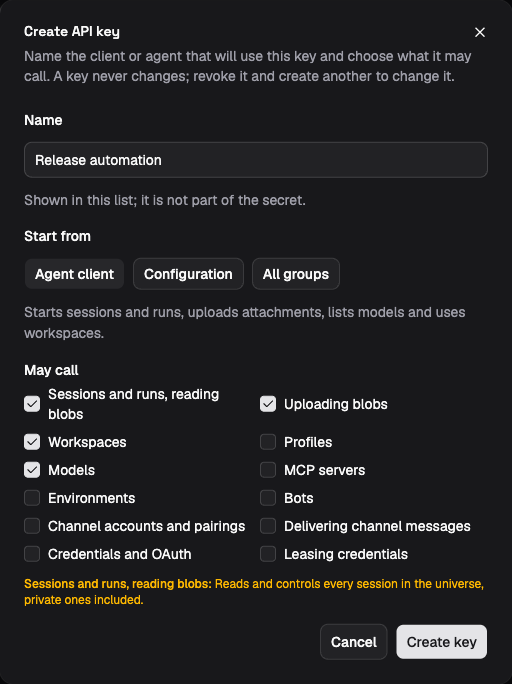
The demo form shows the Agent client preset before key creation. Review the selected groups and their warnings before choosing Create key.
Platform administrators can instead use Platform admin → API keys to select a universe or deployment scope, method groups, and actor assertion. The host CLI provides the same controls. For example, to restrict a key to profile operations in an existing universe:
lightspeed-runtime api-key create \ --universe-id "<universe-uuid>" --name "Profile automation" --group profilesRepeat --group for additional groups. This key can modify profiles; the group
does not mean read-only access. Verify it with a profile read through the
API client, then confirm
an operation outside that group is refused.
Core stores a SHA-256 hash of the random secret, a display prefix, and key metadata. Choose Rotate on an active key to replace its secret immediately. The new secret is shown once and the old secret stops working for subsequent requests, with no grace period. Update every client using that key. Rotation changes the display prefix and clears last use, while preserving the name, scope, groups, actor flag, creator and creation time. Revoked keys cannot be rotated. The Platform records the old and new prefixes in its access audit. Keys that assert actors must be rotated from Platform admin → API keys.
Both CLIs support rotation by the current prefix:
lightspeed api-key rotate "<key-prefix>"lightspeed-runtime api-key rotate "<key-prefix>"The first command uses the configured connection; the second accesses the store from the server host. Each returns the new secret once. If you rotate the credential used by your CLI connection or Platform service, update that configuration before making further requests.
The scope, groups, and actor flag cannot be edited. To change authority, create a replacement, update and verify its consumer, then revoke the old key in the UI or by prefix:
lightspeed-runtime api-key listlightspeed-runtime api-key revoke "<key-prefix>"Rotation and revocation reject subsequent requests using the old secret. Already admitted requests, including parked long-poll reads, are not reauthenticated while waiting. Revocation does not cancel admitted work or recall credentials delivered to another process.
Connect services
Give each service the groups its API calls require:
| Service | Key and behavior |
|---|---|
| Platform | Deployment key with all groups and actor assertion; the Platform gates member requests. |
| Shipped channel connector host | Deployment key with deployment/channels, channels/inbound, auth/lease, and blobs/put; account requests select their universe. |
| Configurator MCP client | Supplies its own key per request; Configurator forwards its authority to core. A browser login is not a credential for this path. |
| Platform’s Configurator setup | Creates a universe key with profiles, mcp, environments, bots, channels, auth, and models, without actor assertion. It excludes session, so the key cannot call session methods. |
The Platform stores the Configurator setup key in an outbound credential grant for the MCP connection. That credential lets an attached agent configure shared resources; the requesting person’s role does not travel through the MCP call. Follow Configurator MCP or Channel connectors for connection procedures, and Agent and tool access for the execution boundary.