

The Lightspeed manual
Private and shared work
A new standalone session starts private. Through the Platform, only its creator and the universe’s Admins can read it. The creator can investigate a problem, collect context, and then share the conversation with the whole universe when it is ready for other people to use.
This is a Platform visibility rule. A direct core API key with the session
method group can access private sessions in its universe. Such keys are
integration credentials and are not limited by a person’s membership or role;
see API keys and service access.
Follow a session from private to shared
Suppose an Acorn Contributor creates a session to review a release. Its header shows a lock marked Private. Other Contributors cannot find or open it, but Acorn’s Admins can. Private work is not hidden from the people administering the universe.
After finishing the initial review, the creator opens the session title menu and chooses Share with universe…. The confirmation explains that sharing includes the session’s sub-agents and cannot be undone. Choose Share to publish that conversation to the team. The header now shows Shared.
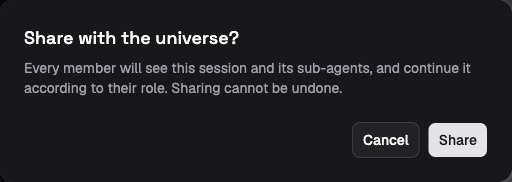
The demo’s sharing confirmation names the new audience and includes the session’s sub-agents. Sharing cannot be undone.
flowchart LR
    P["Private root session<br/>Creator and Admins can read"] -->|"Creator or Admin shares"| S["Shared root session<br/>All universe members can read"]
    P -.-> PC["Its sub-agents are private"]
    S -.-> SC["Its sub-agents are shared"]
Sharing changes who may use the same continuing conversation. It does not make a snapshot or start another session. Viewers can inspect it; Contributors and above can continue, steer, or cancel its work, subject to ordinary session lifecycle rules. Configuring the session or overriding a run’s model or reasoning options requires an Operator or Admin. Someone joining the universe later can read its shared history too.
What each person may do
The Platform first checks the member’s role, then the session’s visibility and creator. These checks apply on the server as well as in the UI.
| Operation | Private session | Shared session |
|---|---|---|
| Read | Creator and Admins | Every member |
| Start runs, steer, cancel, or approve tools | Creator with Contributor or Operator role, and Admins | Contributors, Operators, and Admins |
| Close or force-close | Creator with Contributor or Operator role, and Admins | Operators and Admins |
| Configure setup or override run options | Creator with Operator role, and Admins | Operators and Admins |
| Share | Creator with Contributor or Operator role, and Admins | Already shared; no reverse operation |
| Soft-delete a closed session | Admins | Operators and Admins |
| Set deletion retention | Admins | Admins |
A creator downgraded to Viewer can still read their session but cannot control, share, or delete it. An Operator does not acquire another creator’s private work by managing profiles or environments. Platform admins act as Admin in every universe.
Soft deletion requires closing the session first and hides it even from universe Admins. A cascade must contain only closed sessions; Operators cannot include private forks. Permanent deletion requires a Platform admin and prior soft deletion. See Sessions and runs for the procedure and retention behavior.
One root determines the audience
A root is the resource from which a session inherits its visibility and creator attribution. A standalone session is its own root. Delegated sub-agents follow the root of their parent, including through further levels of delegation. Share the root session; an individual child cannot choose a different audience.
Bots and all their conversations are always shared with the universe, as are their sub-agents. There is no private bot setting. Members’ roles determine whether they can read, invoke, or manage the bot. The runtime’s own bot and sub-agent controllers have separate limits on which sessions they may control; Agent and tool access explains those checks.
Sharing currently has only two states: private or shared with the universe.
There are no named-person invitations, group audiences, or per-session read
and write grants. The API calls private visibility restricted and shared
visibility universe.
Files keep their own access boundary
Keeping Acorn’s review conversation private does not make its attached workspace or execution environment private. If the agent writes its findings into a shared workspace, other members can read them through that workspace before the session is shared. The same distinction applies to files on an attached machine and to external systems reached through tools.
Content-addressed blobs also have a separate read path. A caller who knows a blob’s digest and has blob-read permission in the universe can read it without a session visibility check. The Platform permits that method from Viewer upward. Session visibility therefore controls access to the conversation, not every copy of data it refers to. See Tenant isolation and data protection for the storage boundary.