

Using Lightspeed
Models and credentials
Each session selects a model through three values: a provider ID, an API kind, and a model name. Together they tell Lightspeed where and how to make model requests. Credentials are stored separately, so a profile can refer to a provider without containing its API key.
For example, openai identifies the built-in OpenAI connection, while
openai:responses selects the Responses wire format. The model name selects
a model available on that connection. An OpenAI-compatible service can use
the same wire format under its own provider ID and endpoint.
Provider connections belong to a universe. Use an Operator or Admin account to configure them on the Models page. Once connected, select the model in a profile or session setup.
Connect OpenAI or Anthropic
- Open Models → Add provider.
- Choose OpenAI (API key) or Anthropic (API key).
- Enter the provider API key and choose Save key.
- Check Available models, then choose Done.
- Open a profile and select one of those models under Model configuration → Model. Save the profile and create a new session from it.
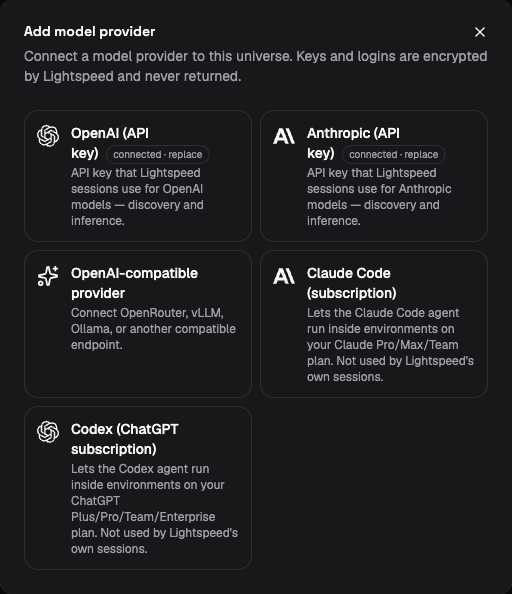
The demo’s provider catalogue separates connections for session models from subscriptions used by coding agents inside environments.
Run a small task to verify that generation works. Then test one capability the profile actually needs, such as reading a workspace file. Model discovery confirms that a model is selectable; it does not prove that every tool, generation setting, or media input works with that model.
The Claude Code (subscription) and Codex (ChatGPT subscription) options on the same page supply credentials to coding agents running inside execution environments. Lightspeed’s own session model calls use the API-key connections above. See Environment credentials to use a subscription inside a machine.
Connect an OpenAI-compatible provider
Compatible providers let Lightspeed use a service implementing OpenAI-style Responses, Chat Completions, or Audio Transcriptions endpoints. Compatibility describes the request format; individual services and models can support different features.
Open Models → Add provider → OpenAI-compatible provider. Choose a Provider preset for DeepSeek, OpenRouter, Ollama, or vLLM, or choose Custom provider. Configure:
| Field | What to enter |
|---|---|
| Custom provider ID | For a custom provider, a stable identifier used by model selections. Presets supply their IDs automatically; deepseek and openrouter select the corresponding compatibility rules. |
| Base URL | The API base URL advertised by the service, including its API path when required. |
| API key (optional) | The service’s key, or leave it empty for an endpoint that does not require authentication. |
| API kinds | The endpoints the service actually implements: Chat Completions, Responses, and/or Audio Transcriptions. The form defaults to Chat Completions. |
| Extra headers | Non-secret service-specific headers, if required. Authentication has its own field. |
Choose Save provider, check model discovery, and select a model in your profile. If a provider does not list the model you need, use manual model selection below.
The base URL must use HTTPS except for loopback addresses. It cannot contain
embedded credentials, a query, or a fragment. Extra headers cannot replace
reserved headers such as Authorization, Host, or Content-Type.
The runtime makes these requests. A URL containing localhost therefore
refers to the machine or container running that process, not the computer
running your browser. In a deployment with separate gateway and session
workers, both discovery and generation need access to the endpoint from their
respective processes.
When editing an authenticated compatible provider, reenter the existing API key or provide a replacement, even if you are changing only its URL or headers. The form cannot read a saved secret back into its input and requires that reentry before saving.
Select the route explicitly
The model picker normally presents a single choice for a model even if the provider advertises it through two API kinds. It prefers Responses when both are available. Choose Enter model manually to specify the full route:
| Field | Meaning |
|---|---|
| Provider id | The universe connection to use, such as openai, anthropic, or a compatible provider ID. |
| API kind | openai:responses, openai:completions, or anthropic:messages, as supported by that connection. |
| Model | The exact model identifier accepted by the provider. |
Use manual entry when discovery omits a supported model, or when you need Chat Completions instead of the picker’s preferred Responses route. Select an API kind implemented by that provider.
For an existing session, change compatible model settings only while it is idle. Provider identity and API kind are fixed for that session because its conversation can contain provider-native state. Retained reasoning or native compaction state can also restrict model changes within that route. Create a new session for an incompatible model or route. A profile change can select a different route for future sessions.
Leave optional reasoning and generation settings unset until you need them and have verified the chosen model supports them. A provider can accept a model name while refusing an incompatible parameter.
Choose universe defaults
Under Models → Defaults, an Operator or Admin can choose, change, or clear two independent defaults:
| Default | Used for |
|---|---|
| Agent runs | New sessions whose setup and profile leave the model unset. |
| Speech-to-text | Transcription jobs without an explicit model, including web dictation and channel voice messages. |
Choose Choose model or Change, select a discovered model or enter its provider, API kind, and model name, then choose Save default. Manual models do not need to appear in discovery. Adding a provider credential alone does not choose a default.
For a new session, an explicit session model takes precedence over the
profile’s model, followed by the universe’s Agent runs default. If all
three are unset, creation fails with model_default_unset; Lightspeed does
not assume an OpenAI route. An explicit model works without a universe default.
The resolved model is saved in the session. Changing or clearing a default does not retarget existing sessions, forks, clones, or admitted work. Applying a profile or replacing an existing session’s configuration with the model omitted preserves that session’s current model. Other configuration fields retain their replacement semantics.
The CLI and
models/defaults/read and models/defaults/put APIs manage the same defaults.
Updates check a revision; if someone changes the defaults first, reload and
review their selection before saving again.
Configure speech-to-text
To use web dictation or channel voice messages, configure a provider that
supports openai:audio-transcriptions, then choose its transcription model
under Models → Defaults → Speech-to-text. The built-in OpenAI provider and
compatible endpoints use this protocol. A compatible endpoint uses its saved
URL, headers, and authentication, including an explicitly credentialless
configuration; it does not fall back to OpenAI if that setup fails.
Choose a discovered speech model or enter the exact model name manually. Some providers omit transcription models from discovery. The speech default is independent of Agent runs, so the conversational model does not need to accept audio. Setting only a conversational default leaves dictation unavailable.
The microphone in the session composer reports why dictation is unavailable. Check the selected speech route and its credential, browser recording support, microphone permission, and a secure browser origin. Channel voice messages use the same universe default before delivering text to the bot.
Understand deployment credentials
An operator can supply deployment-level OpenAI or Anthropic credentials. Those are fallback credentials when the universe has no corresponding model record. A universe-specific record takes precedence.
This precedence is intentional. If a universe record exists but is disabled or cannot supply a usable credential, the request fails rather than silently using the deployment’s credential. Removing the built-in provider record allows fallback again. Consider that difference when rotating or disabling keys.
LIGHTSPEED_CHAT_PROVIDER and LIGHTSPEED_CHAT_MODEL are retired. The runtime
refuses startup if either is set. Remove them and configure each universe’s
model defaults instead. Provider credentials and transport settings remain
deployment options, as listed in the
environment-variable reference.
The API also supports model OAuth records that refer to a suitable stored grant and audience. The broker refreshes access tokens for those records. There is no general model OAuth setup flow in the current web app; integrations that need it should use the authentication types and methods in the API reference.
Check capability compatibility
Model choice affects which tools Lightspeed can expose. Built-in web search supports Responses and Anthropic Messages; Chat Completions supports page fetching but not that search feature. Native MCP execution works across all three API kinds, while provider-hosted MCP has additional restrictions. Tools and MCP explains those choices.
Media support also depends on the selected model. Connecting a chat account that accepts an image does not make a text-only model able to interpret it. Verify the input types used by your actual tasks.
If model requests fail
| Symptom | What to check |
|---|---|
Creating a session reports model_default_unset |
Choose the universe’s Agent runs default, or select a model explicitly in the session or profile. |
Runtime startup rejects LIGHTSPEED_CHAT_PROVIDER or LIGHTSPEED_CHAT_MODEL |
Remove the retired variables and configure universe defaults through Models or the CLI. |
| The provider connects but the model is missing | Refresh discovery or enter the exact route manually. Confirm that the credential can access that model. |
| Authentication fails despite a deployment key | Check for an existing universe provider record. Disabled or unusable records block fallback. |
| A compatible service is unreachable | Test reachability from the gateway and session-worker network, and check the base URL and API path. |
| A request rejects tools or generation parameters | Reduce the setup to the supported capabilities and leave optional parameters unset. Discovery alone does not establish feature compatibility. |
| A subscription login did not enable session inference | Configure the model provider separately; coding-agent subscription integrations serve tools inside environments. |
| Updating a profile did not change the current session | Start a new session or update the idle session’s setup explicitly. See Profiles and instructions. |