

Using Lightspeed
Profiles and instructions
A profile is a reusable agent setup: its model, instructions, tools, and attached resources. You can use the same profile for an interactive session, a bot, or a delegated sub-agent.
For example, a release editor needs instructions about factual claims, a model that can call tools, and write access to the release workspace. A release reviewer can use the same files with read-only access and a different job. Separate profiles let you reuse each setup without configuring it again.
Profiles belong to a universe. Use an Operator or Admin account to create or edit them. Contributors can select an existing profile when creating a session, but cannot customize its setup or save a new profile.
Viewers and Contributors can inspect the same Form view used by editors, including expandable configuration sections and readable input values. Editing controls are read-only or disabled, and save actions are hidden. JSON remains available as a read-only view of the underlying document.
Create a profile for a job
Open Profiles → New profile and enter Release reviewer as the
Display name. Its ID is derived from the name; choose Change beneath
the name to set Profile id to release-reviewer if needed. Keep the
default empty starting point and choose Create to open the editor.
The editor has Form and JSON views of the same setup. Start with the
form; use JSON when you need to inspect or transfer the underlying document.
The API reference defines
the full ProfileDocument and SessionConfig shapes.
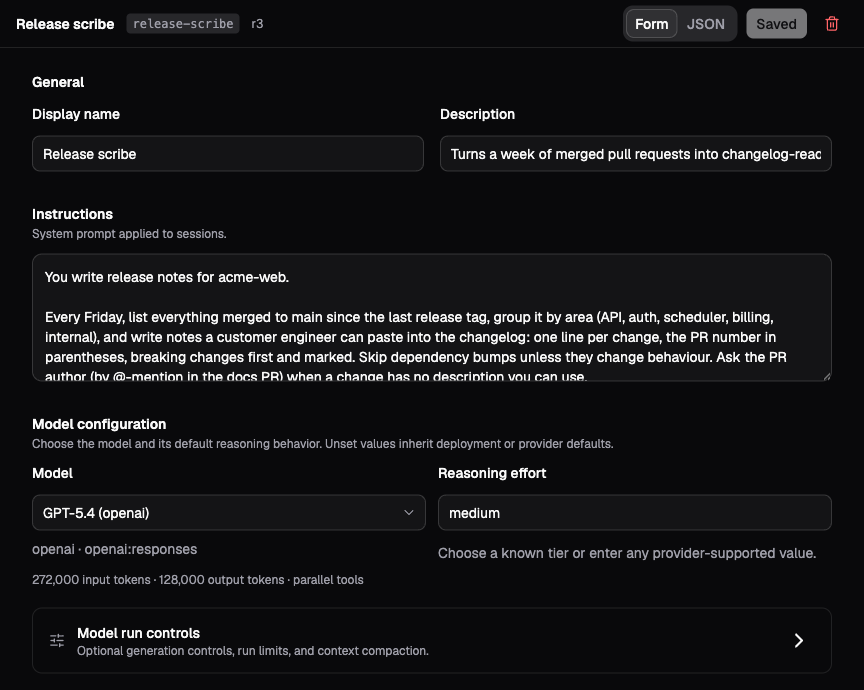
The demo’s Release scribe profile shows where instructions and model settings live. Use the reviewer instructions below for this walkthrough.
Set Description to a short account of when this agent is useful. For a reviewer, use something like:
Checks release notes against a supplied change list and reports unsupportedclaims without editing files.Descriptions help people choose profiles and help a delegating agent select the right specialist. Put the actual procedure in Instructions:
You review release notes against the source material supplied for the task.Read the change list and the proposed release notes before reaching aconclusion. For each unsupported or missing claim, cite the relevant fileand explain the discrepancy. Do not edit files. If the source is ambiguous,report the uncertainty instead of filling in the gap.Select a Model and enable the capabilities this job requires.
For the reviewer, enable Virtual File System: Files, Instructions, Skills
and choose Add workspace. Select release-notes, set Session path to
/workspace, and choose Read only access. Save the profile.
Create a session from it and ask it to compare /workspace/changes.md with
/workspace/release-notes.md. Verify both the review and the tool activity.
The first-agent walkthrough shows the
corresponding editor profile and source files.
Give instructions and grant capabilities
Instructions explain how the agent should work. Capabilities determine which operations Lightspeed makes available. Both matter: “do not edit files” expresses the reviewer’s procedure, while read-only tools and links enforce the file-access boundary even if the model asks to write.
The editor groups capabilities into VFS, Web, Sub-agents, Code mode, Timers, Environments, and MCP Servers. Attach a workspace, environment, or MCP server to make that resource available, then select the access this job needs. Workspace access can be read-only or editable. Environment access can also allow processes and jobs. An MCP attachment can select a subset of the server’s allowed tools. Tools and MCP explains the choices.
Enabling VFS or Environments in the form also turns on Prompt loading and Skill discovery. Adjust those switches separately when the agent should use files without loading instructions or skills from them. Both search conventional directories by default. Use Customize roots when a project keeps these sources elsewhere; see Workspaces and skills.
The VFS and each environment attachment have their own Working directory.
Set /workspace as the VFS directory if relative file paths should start
there. Environment file tools, commands, jobs, and discovery use the active
attachment’s directory, or the machine’s default when it is blank. A command
can override its own working directory without changing the session setting.
Attaching both a workspace and an environment also makes VFS transfer possible. The destination needs edit access; the source needs read access.
Apply the same reasoning to delegated work. A parent that can call a powerful child profile can ask that child to use its capabilities. The child’s setup is independent; it is not automatically reduced to the parent’s grants. Sub-agents and federation explains that boundary.
Keep model credentials on Models, and reusable tokens on Credentials. Profiles refer to provider IDs, MCP server IDs, and environment configuration rather than embedding API keys in instructions. See Models and credentials and Tools and MCP.
Combine profile text with workspace instructions
Profile Instructions can hold the agent’s stable role and working rules. For project-specific instructions that should travel with files, enable VFS Prompt loading. Lightspeed loads the prompt files from its roots and combines them with the profile’s instruction text.
The profile text comes before the sourced files. Keep the sources consistent: if one says to edit the document and another says never to edit it, their order cannot resolve the contradiction reliably.
Built-in default instructions are a fallback when no authored instruction sources remain. They are removed when custom instructions are present. In an existing session, editing Custom instructions changes the same managed instruction layer used for profile text; clearing it still leaves any sourced prompt files active.
Use a skill for a procedure the agent needs only on relevant tasks. Skill discovery presents a short catalog, allowing the agent to read the procedure when useful. Workspaces and skills walks through both prompt sourcing and a review skill.
Apply changes deliberately
A new ordinary session receives the profile’s setup at creation. Saving a later profile revision affects future sessions; existing conversations keep their current setup until you apply a change.
For a one-off change in the Platform, an Operator or Admin opens the idle session’s Session settings, edits the setup, and chooses Apply setup. Contributors can inspect these settings but cannot change them, including custom instructions or the active environment. To apply a saved profile to an existing ordinary session, use the CLI with the connection settings described in Sessions and runs:
lightspeed session profile apply "<session-id>" --profile release-reviewerThe API equivalent is session/profiles/apply. The session must be open with
no active or queued runs. Its provider identity and API kind are fixed for the
lifetime of the session. An explicit profile model must use that same route
and be compatible with retained native state. An omitted model preserves the
session’s current model; it does not resolve the universe default again.
Create a new session for an incompatible route or model.
Applying a profile is not a deep merge of every field:
| Profile content | Effect on an existing session |
|---|---|
config present |
Replaces the session configuration, preserving the current model if the new model is omitted. Include the capabilities and attachments you intend to retain. |
config absent |
Leaves the current configuration in place. |
instructions present or absent |
Replaces or clears the profile instruction layer. Sourced prompt files follow the resulting VFS setup. |
| The active environment is no longer attached | Clears the active environment. |
An environment attachment marked default |
Activates it only when the session has no active environment afterwards; a live selection of a still-attached machine is left alone. |
| Metadata and retention defaults | Remain creation defaults; applying the profile does not rewrite the existing session’s metadata or retention. |
Bots follow their named profile differently. Their Main conversation adopts profile changes at a later idle reconciliation. Existing routed threads keep their setup until closed and replaced. A shared profile can therefore affect several bots; review its users before changing their grants or model. If a new API kind requires a fresh Main conversation, the controller creates a successor. See Bots and triggers.
Set limits and a default environment
The advanced Run limits fields include Max turns and Max tool rounds. They bound a run’s work under the selected defaults. Direct runtime API callers with suitable key access can provide per-run overrides, so these fields should not be treated as hard authorization ceilings. The Platform refuses Contributor requests with run configuration overrides. Bot daily budgets and sub-agent tree limits govern different scopes.
Choose a default environment attachment when new sessions should start with an active machine. Without one, the session starts with no active environment. Applying a profile also activates its default when the session has no active environment; it preserves an existing selection that remains attached.
A sub-agent profile can instead inherit the parent’s active environment. Create machines and assign their credentials on Environments before attaching them to profiles. Closing a session leaves its machines intact. See Environments for setup and cleanup.
Metadata and retention settings supply defaults for newly created sessions.
Use metadata for organization, such as project=acorn, and retention to
choose when a closed session tree is soft-deleted from ordinary views; history
remains stored until a Platform admin purges it. Through Platform, only Admins
can create sessions with a deletion schedule. Non-admin creation and bot
conversations do not inherit profile deletion schedules. Neither metadata nor
retention supplies instructions to the agent.
If the setup does not take effect
| Symptom | What to check |
|---|---|
| A saved profile change has no effect in an ordinary session | Apply it explicitly, edit session setup, or start a new session. |
| The agent describes a tool it cannot call | Check the feature grant and its attachments’ access; instructions alone do not expose tools. |
| Applying a profile removes a previous capability | A supplied config replaces the whole configuration. Include all intended grants. |
| Clearing custom instructions leaves instructions active | Check VFS prompt roots and their files. Those are a separate authored source. |
| A bot thread still uses the previous setup | Main reconciles at idle, while an existing routed thread keeps its setup. Reset the appropriate conversation when ready. |
| A concurrent edit is rejected | Reload the current profile or session revision, review the other change, then save again. |